

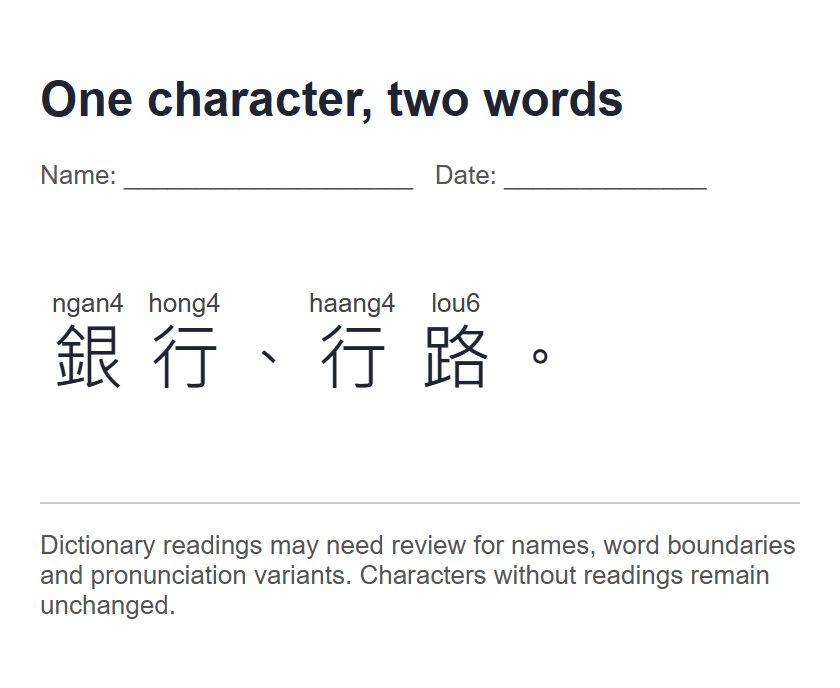
A useful reading sheet starts with words you intend to learn. It does not need a long passage. This example uses 銀行、行路。 to show why the surrounding word matters: the two instances of 行 receive different readings. You will review the result, give the sheet a title, and keep a version with room for handwritten notes.
Start with words, not a list of isolated characters
Open Cantonese reading sheets. Replace Chinese text with 銀行、行路。 and select Create reading sheet. Wait for the result before changing the layout. The tool loads the dictionary files it needs for the passage.
Keep 銀行 together and 行路 together. The lookup prefers the longest known dictionary word, then handles remaining characters individually. Splitting every character onto a separate line would remove useful word context from this example.
For your own sheet, begin with a few expressions from a lesson, message, or the everyday phrase cards. Include punctuation where it helps reading. This tool adds readings to written characters; it does not rewrite Mandarin grammar into natural spoken Cantonese.
Check the word readings before practising
The verified result reads 銀行 · ngan4 hong4 and 行路 · haang4 lou6. The same written 行 has a different reading in each word. Read the full pair, not just the romanization placed over one character.
When available, open Review alternative readings and choose the listed reading that fits your intended word. This short example already receives the two readings above without changing an alternative. The control is shown only when the result contains choices.
Check unfamiliar names, specialist vocabulary, and ambiguous wording with a teacher or reliable source before drilling them. A dictionary ranking is a starting point, not sentence-level understanding. If a file fails to load, the page marks the result incomplete; use the main action again to retry.
Unknown Chinese characters stay in the passage without invented readings. A dashed underline draws attention to them. You can still inspect the known words, but resolve the missing reading before treating the sheet as a complete answer key.
Make a reading copy and a recall copy
Set Sheet title to One character, two words. Choose Large under Character size, then With practice lines under Layout. Leave Show Jyutping checked for the answer copy shown above.
Large uses the tool’s 36-pixel character setting. Practice lines add space beneath the reading for notes or handwriting. The downloaded example keeps this title, size, and layout; the illustration above is a render of that actual HTML output.
For a recall exercise, uncheck Show Jyutping. The Chinese text remains while its reading annotations disappear. Download this version separately and rename it on your device so you can distinguish the exercise from the answer copy.
Avoid squeezing too much text onto the first sheet. A few reviewed words leave room to annotate a missed tone or a confusing final. You can prepare another sheet when those words feel familiar.
Download or print the reviewed result
Choose Download HTML to save cantonese-reading-sheet.html. Open it in a browser to read the sheet again. The file retains the current readings and display options and can be reopened without rerunning the lookup.
Choose Print / Save PDF to use your browser’s print dialog. Select a printer, or a PDF destination if your browser provides one. Check its preview, margins, paper size, and scale before saving; these are browser settings rather than a separate site PDF converter.
If you only need romanization, use Copy Jyutping. For a quick text lookup without sheet formatting, open Chinese to Jyutping. Keep the original characters beside your notes so you know which word each reading belongs to.
Common questions
Can I hide the answers without changing the passage?
Yes. Uncheck Show Jyutping. The displayed and downloaded sheet keeps the Chinese text but omits its reading annotations. Save an answer copy first if you want both versions.
Does the HTML download contain the website controls?
No. It is a clean reading document with your title, text, selected readings, and layout. It is separate from the tool page and its buttons.
Why is 行 pronounced differently in the two words?
The verified dictionary matches are 銀行 ngan4 hong4 and 行路 haang4 lou6. Keep each whole word with its reading. An isolated character lookup cannot always select the form needed in context.
Is the sheet stored in my site account?
There is no account-backed sheet library here. The tool processes the result in your browser; save a download when you want to keep it. Static dictionary requests still occur while looking up the text.
Keep the word and its reading together.
Make a short sheet, check the annotations, and save an answer copy before hiding them.