
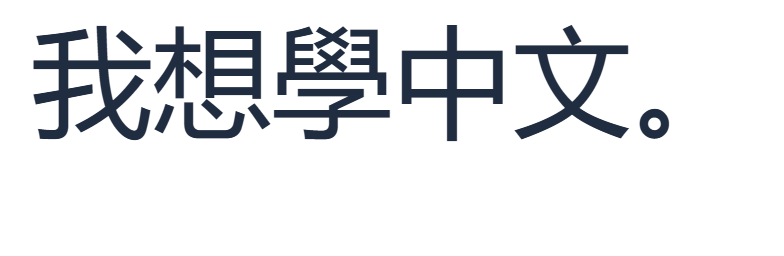

Knowing the symbols is the first step. The next is joining them into something you want to say. We will type 我想學中文。, meaning “I want to learn Chinese,” then save the result. The image above comes from the keyboard’s real image export.
Prepare the reading
Open the Zhuyin keyboard. Your selected Chinese characters go in the large editor; phonetic input goes in the smaller Zhuyin symbols box. If an earlier draft appears, copy anything you want to keep before clearing it.
Our sentence has five syllables. Read this sequence from left to right:
- 我:
ㄨㄛˇ - 想:
ㄒㄧㄤˇ - 學:
ㄒㄩㄝˊ - 中:
ㄓㄨㄥ, first tone - 文:
ㄨㄣˊ
Open Typing settings and check that Compose whole sentences is on. It starts on in a fresh browser profile, but a previous choice may be remembered. This example keeps Allow typing without tones off and uses the full readings.
Enter the reading, including first tone
Close the settings panel. To reproduce the example, paste this line into Zhuyin symbols:
ㄨㄛˇㄒㄧㄤˇㄒㄩㄝˊㄓㄨㄥ ㄨㄣˊ
There is one ordinary space after ㄓㄨㄥ. Here it completes the first-tone syllable. The other syllables end with their visible tone marks, so they do not need separating spaces in this input.
That space is part of the reading, not a request to put a gap between 中 and 文. The chosen Chinese sentence has no space there.
For practice, enter the same symbols using the on-screen keyboard or the small physical-key labels. If the positions are unfamiliar, keep the Bopomofo chart nearby and work through the five syllables slowly.
Choose the characters you mean
Wait for the candidate buttons, then choose 我想學中文. In the verified example it was the first suggestion. Candidate order can change with your settings and saved choices, so read the words before selecting them.
The same reading also offered alternatives such as 我響學中文. A phonetic match alone does not make a sentence correct. Check all five characters, especially the middle ones, before accepting a suggestion.
You can click the candidate directly. With the caret at the end of Zhuyin symbols, Enter chooses the first candidate. Use that shortcut only after checking it. Ordinary number keys still enter Zhuyin symbols; the displayed candidate shortcuts use Alt plus a number.
If a longer sentence is hard to review, build it one word or syllable at a time. The same five readings can produce the individual characters in this example. Undo and Redo let you revisit an insertion without starting again.
Add punctuation, then copy or save
Click after the sentence in the large editor and insert the Chinese full stop 。. The finished text is 我想學中文。. Check that the input box is empty and that the editor contains the final text you want.
Choose Copy text to paste the sentence elsewhere, or Save image for a PNG. The image shown here was exported with Arial selected at size 120. To use the same settings, open Text style and set Size (px) to 120; choose a smaller size for ordinary writing. Font availability can change the appearance on another device.
Save Word creates a Word .docx file. Copy and both exports use the whole editor, so remove unrelated draft text before saving.
Common questions
Why is the first-tone space needed?
In this toned input, Space completes the unmarked first tone of ㄓㄨㄥ. A space typed with no pending composition can instead be ordinary editor text. Its purpose depends on whether you are composing a reading.
Can I enter a sentence without tone marks?
Allow typing without tones is available in Typing settings. It can find likely matches from phonetic symbols, but tones help narrow the reading. Keep it off while following this example.
Can I add Zhuyin above my finished Chinese text?
Use Chinese to Zhuyin for pronunciation annotations. Readings follow the dictionary and may need review for names or context.
What is a useful next practice step?
Re-enter the five syllables without copying the input line. Then try a short exercise in Zhuyin typing practice, checking tones as carefully as the symbols.
Write a sentence of your own.
Start with the example, then try a short message you want to use.