

You can recognize a Chinese character without knowing how to type it. Cangjie gives you a route through its shape-based code. This exercise follows one character, 語, from a reverse lookup to a real keyboard result, with a study sheet you can keep beside your next practice session.
Start with a character you recognize
Open Cangjie code lookup. Replace the example in Chinese characters with 語. The tool updates as you type; you can also select Look up codes.
The result card shows the character and its Full code: YRMMR. Keep all five letters. Cangjie codes describe shapes rather than pronunciation, so you do not need to supply a Mandarin or Cantonese reading for this lookup.
Start with one unfamiliar character before trying a passage. The tool shows each distinct Chinese character once and ignores spaces, punctuation, and Latin letters.
Read the code as an ordered key sequence
Select YRMMR on the result card. The Code in focus panel opens with five root keys in order: Y, R, M, M, R. Their labels are 卜、口、一、一、口. Notice the repeated M; each position belongs in the sequence.
Use the Cangjie root chart when a key is unfamiliar. The labels identify the keys and their shape families. They are a memory aid, not a literal drawing of every stroke in 語. For explanations of character parts, continue with the guided decomposition examples.
Type the full code and choose the character
Open the Cangjie keyboard. Check that Select Input Method shows Cangjie, then enter yrmmr in Input code. Use ordinary English letter input on your device if another system input method is intercepting the keys.
When 語 appears, select its candidate button. The character moves into the large editor and the code field clears. Compare the editor with the character you originally looked up.
You can also choose with the candidate's displayed number. With the caret at the end of the input code, Space chooses the first candidate. Enter inserts a line break, so it is not the selection shortcut for this keyboard.
If you chose the wrong result, use Undo and try the full code again. Check letter order before assuming that a character is missing.
Keep the code and the typed result
Back in code lookup, choose Download study sheet to save the character, full code, root sequence, and derived Quick form. This example produces cangjie-study-sheet.html, which you can reopen in a browser. Print is useful when you want a paper reference.
In the keyboard, Copy text copies the editor's Chinese text. Save Word produces a Word i2bopomo-cangjie.docx; Save image produces i2bopomo-cangjie.png. These actions use the whole editor, so check for an older draft before saving.
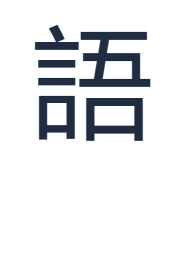
For the image shown here, we used Arial at size 120. Open Text style and set Size (px) to 120 for the same settings. The PNG is a visual copy of 語. It does not include the lookup code, which is why the separate study sheet is useful.
Common questions
Do I always type five letters?
No. Codes can be shorter. For example, 明 has the full code AB. Keep the complete code shown for your character; do not pad a shorter code or remove letters from a longer one.
Can I check a code I already know?
Use Cangjie code breakdown to read its root keys. That tool explains a sequence but does not prove that it belongs to a particular character. Use character lookup for that connection.
Why is a character missing from lookup?
The dictionary does not contain every Chinese character or vendor extension. Missing codes are left unfilled. A dictionary download failure is reported separately; retry it before treating the character as unsupported.
Should I memorize the roots or the whole code?
Practice both together: name the keys, keep their order, then type the character. Start with a few familiar examples in Cangjie practice. Repeated successful recall is more useful than copying a long list once.
Turn a code into a character.
Type yrmmr, choose 語, and keep the sequence for review.